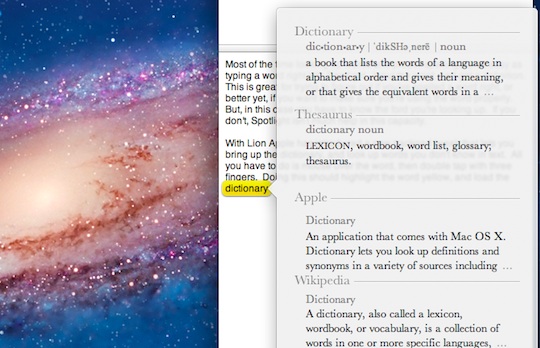
Most of the time looking up words and proper spellings is as easy as typing a word right into Spotlight: input the word, and get a definition. This is great for trying to figure out if you’ve spelled a word right, or better yet, if you want to make sure you’re using the word properly. But, in this case you have to know the word you’re looking up. If you don’t, Spotlight isn’t much help in this capacity.
With Lion, Apple has introduced a new trackpad tweak that lets you bring up the dictionary, and look up words you don’t know from directly within the text. All you have to do is mouse over the word, then double tap with three fingers. Doing this should highlight the word yellow, and load the dictionary.
There you go. You no longer have to head to Google to look up that word that’s outside of your lexicon.
Don’t forget to check out our Lion review.








We’ve had this feature since at least Snow Leopard, just not with the trackpad. Control + Cmd + D. I use it several times a day!!
- spam
- offensive
- disagree
- off topic
LikeThis is not working. The option is checked as suggested and my magic trackpad is definitely working yet the three-fingered-double-tap dictionary lookup still doesn't work. I guess this is a Lion bug?
- spam
- offensive
- disagree
- off topic
LikeSorry but I tried several times and nothing happens...
- spam
- offensive
- disagree
- off topic
LikeYou need to activate this feature first. Go to System Preferences -> Trackpad -> Point & Click and check the Third Box for Look up.
- spam
- offensive
- disagree
- off topic
LikeHi Charlie,
Thanks for your interest. I had already did it but it is not working...I do not know why..
- spam
- offensive
- disagree
- off topic
LikeHi again,
Good news...i did a permissions disk repair, reboot and...it is working...
Lion surprise...
I do have yet the problem with the battery lasting, before with Leoparda I had 7-8 hous and now I can get 5 hours...
Let's wait for un update form Apple.
Thanks,
- spam
- offensive
- disagree
- off topic
Like