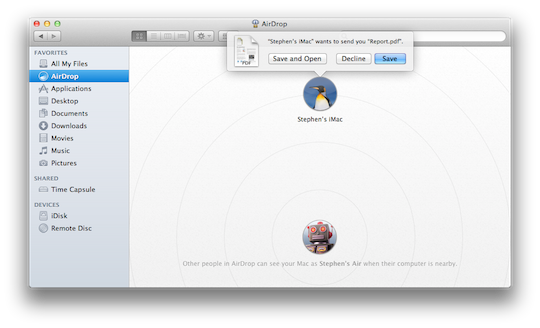
I am really enjoying Mac OS X Lion. I have upgraded all four of my Macs to Lion, and everything looks to be working well. There are a few hiccups here and there, but overall I am able to fix them or get around them. One thing I found, though, is not so much a glitch as a missing feature. That missing feature is no other than AirDrop. Apparently, when it comes to AirDrop, no two Macs are alike.
I was working on my daughter’s 20-ich iMac Intel Core 2 Duo 2.16GHz, and I wanted to use AirDrop to take some files and drop them onto my MacBook Pro 15-inch Quad-Core i7 2GHz. So, I venture to Finder, and lo and behold AirDrop is missing. I close Finder. At this point I’m thinking there is a glitch or bug on my daughter’s iMac. I open Finder again, and still no AirDrop. I look at my MacBook Pro, and AirDrop is in Finder where it should be.
Enter Google to the rescue. I Googled, “AirDrop does not appear in Finder,” and I found an Apple Discussion Thread. As I parse through the thread I find an interesting bit of news when it comes to AirDrop. It will only work on newer Macs across the board. Basically, any Mac pre-late 2008 will not work with AirDrop. One commenter on the thread asks, “Why were older macs left out of the airdrop feature?” Another commenter responds by saying, “I think because their wireless cards don’t have the supporting chipset.” There you have it folks. The older Macs have wireless cards with chipsets that are not supported in AirDrop. Finally, the last commenter directs the readers of the thread to this OS X Lion Tech Specifications. The following Macs will support AirDrop:
- MacBook Pro (Late 2008 or newer)
- MacBook Air (Late 2010 or newer)
- MacBook (Late 2008 or newer)
- iMac (Early 2009 or newer)
- Mac mini (Mid 2010 or newer)
- Mac Pro (Early 2009 with AirPort Extreme card, or Mid 2010)
Hope this helps anyone that might be confused as to why one of their Macs has AirDrop and the other one does not. If you have encountered something similar to this, or might have more insight on the whole supporting of the wireless chipset, we would love to hear from you in the comments below.
Via: Apple Support Communities
Source: OS X Lion Technical Specifications