 Do you like listening to the radio? Thanks to TuneIn Radio by Synsion Radio Technologies, you can now do that with any of your iOS devices. It’s a solid app with thousands of radio stations available and lots of features.
The first time I started TuneIn Radio on my iPad, sitting on the couch, it presented me with the local radio station using my GPS location. After selecting the station, it started playing within seconds. A great song was on and I turned up the volume and was surprised to find that the quality was pretty good. Thanks to a top notch integration with iOS, I was able to tap the AirPlay button and select our Apple TV. Within a couple of seconds, the song continued playing on our home entertainment system. I switched to my iPad’s Mail App to check my emails, and all the while the music from TuneIn Radio was still playing on my Apple TV. Using the new iOS background audio controls (double press the home button and swipe right), I was able to redirect audio output back to my iPad.
That’s only a taste of what TuneIn Radio offers. Another really great feature is recording and playback of radio content. Anytime during streaming, you can simply press a record button and TuneIn Radio will start recording. Whenever you feel like listing to the content again, you can select it and enjoy the same iOS integration as if you’d listen to the streaming radio. However, you need to use TuneIn Radio to listen to the content and I couldn’t find a way to export recorded audio. 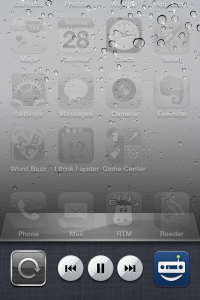
Another neat feature is the sleep timer, essentially an alarm clock that either streams the radio or plays your recorded content to wake you up. You can sync your bookmarked radio stations across devices with a RadioTime account. Depending on the radio station you get lots of metadata like the logo of the station, playlists, artists/song logos and Twitter streams.
TuneIn Radio’s user interface is awesome, mainly because it is simple and straightforward. There are lots of standard iOS components, so it’s easy for you to find your way around. Unfortunately, there are also some annoyances, e.g. the record button of the iPhone app is too small, but overall the user interface is great.
If you are a radio person, love your iOS device and want to listen to your favorite station at home on your Wi-Fi or even on the go over 3G, TuneIn Radio is the app you are looking for.
Photo Credit: ThiagoHenrique