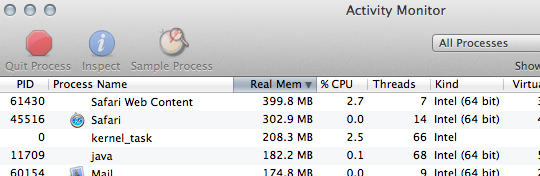
 Hey. Do me a favour? Are you using Safari as your main browser? Go check out Activity Monitor, sort the columns by “Real Memory” with the largest at the top, and tell me what you see. Go ahead. I’ll wait.
Do you see something called Safari Web Content? That’s part of the new Safari 5.1. It’s a part of the “sand-boxing” that Safari does, keeping pages loaded in their own compartmentalized areas, so that if a process on one page crashes, it doesn’t take down everything with it.
Well, now that it’s a separate process from Safari, it’s easier to see just how much memory Safari Web Content is taking up. In fact, it takes up quite a bit, with some users reporting that with many tabs open the memory usage can get over 1.0GB or more. If you’re experiencing this, you’ll probably notice Safari getting slow as the memory creeps up. So, what to do?
Well, the first thing that some are suggesting is to disable any Safari extensions that you may have running, and see if that helps matters. Theoretically there could be some incompatibility issues with extensions and Safari 5.1 that might lead to increased memory usage. If you turn them off, and re-enable them one by one, you might be able to ferret out which extension is causing the problem. TUAW’s Chris Rawson found his Safari Web Content memory usage drop from 1.06GB down to around 300MB when he disabled most of his extensions.
As others are reporting, this issue exists on OS X 10.6 Snow Leopard as well. So it seems that this is a Safari problem, and not an OS X Lion problem. But it’s interesting that we tend to notice things when we make a big change. In our “latest new thing” mode, we tend to check out all the new features, and we check under the hood. We are more likely to notice when something is new. It’s just how we are.
Just for kicks, I tried loading the same 4 tabs in Chrome that I had loaded in Safari. Total memory usage? 82.4 MB. And I also discovered that I hadn’t updated Firefox from version 4 yet. So you see? You notice things when you upgrade your OS!
Via: TUAW