As with Excel, the number of slideshow and presentation applications are few. On the Mac side, there are basically only two: PowerPoint and Keynote.
As I stated in the other Office for Mac 2011 reviews, I am not the biggest Office user. I prefer to try to avoid it, even at work. I tend to do things using the simplest mechanism I know, and most of the time that is creating a custom webpage to do things that I need to accomplish. However, for presentations it is much easier to use either Keynote or PowerPoint. And if you have a choice between PowerPoint versions, I would recommend PowerPoint for Mac 2011.
PowerPoint 2008 was not intuitive. What I mean by this is that the application opens to a blank presentation and finding where in the world to change the bland white to a theme is beyond me. Yes, I know you can change the color pattern for the presentation in the toolbox, and you can change the background color to one of 12 choices, but this is not how most people want to operate. After a bit of searching, I did manage to find that you can add a theme by clicking on the ‘Slide Themes’ tab at the top, but it is not intuitive to find within the menus.

PowerPoint for Mac 2011 changes all this. When you first open PowerPoint, you are presented with 57 different choices for potential templates. You can take any one of these templates and modify it to your liking; however, you are given a choice. This makes it much easier to see if a color scheme is already set that will match the topic of your presentation.
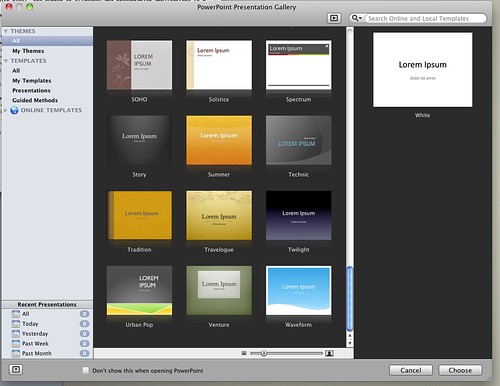
Once you click on a theme you want to use, you are given a set of options on the right side. You get a preview of the title slide, you can choose the color scheme, fonts, and even the slide size.
The options within the slide size are ‘Standard (4:3)’, ‘Widescreen (16:9)’ and ‘Widescreen (16:10)’. The ability to choose which slide size you want allows the user to tailor the presentation to the size of screen. Once you change the screen size option, the preview automatically adjusts to give you a preview of what it will look like. This is a nice addition to accommodate the differences in monitors.

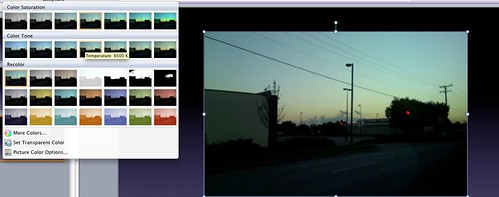
Another new feature that PowerPoint for Mac 2011 incorporates is the ability to recolor pictures. A savvy user might ask, why would anybody want to recolor an image within PowerPoint? Why not just load up an image editor? While those are very good questions, you do have to remember the target market. A less-than-experienced user may not want to have to open a heavy editor like Photoshop just to adjust the color of an image. Sure it can be done in iPhoto, but do you really want a CEO to be editing photos, occupying an hour of tech support’s time just to be able to change the color of an image. I sure don’t.
As with Word and Excel, you are able to utilize the Media Browser to add images, audio, and other media instead of being forced to browse for the item.
Additionally, like the other Office applications, you are able to export your presentations to Microsoft’s Sky Drive cloud storage to be able to access them from almost anywhere.
PowerPoint for Mac 2011 is a solid upgrade that makes the creation of presentations more user friendly. PowerPoint for Mac 2011 refines the process of creating presentations. With additional templates and the ability to preview the template, you can find exactly the theme you want to use to wow the crowd.