Make iTunes 10s traffic lights horizontal

Apple released iTunes 10 yesterday (September 1st, 2010) and there are two things that I don’t like about it. First, the ugly new iTunes icon, and second, the traffic lights. Apple made the traffic lights in this version of iTunes vertical. Fortunately, both of these “problems” are easy fixes. For the icon, I just downloaded a replacement icon, and for the traffic lights, I used Terminal.app to make them horizontal.

So, the first thing to do is open up Terminal. Once it’s open, enter the following command:

defaults write com.apple.iTunes full-window -1
horizontal Make iTunes 10s traffic lights horizontal

That should make the traffic lights horizontal. If you ever want to set them back to vertical, just type:

defaults write com.apple.iTunes full-window -0
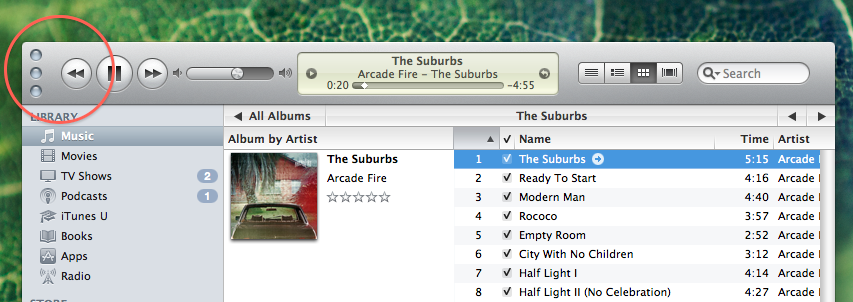
vertical Make iTunes 10s traffic lights horizontal
  • Roy

    Thanks for that. Traffic lights back where they belong.

    • http://mitchjohnson.net Mitch Johnson

      no problem!

  • Edwin

    it is awkward and inconsistent with the ui to put them vertically but it doesn’t look to good to have three circles next to each other with the three play buttons below them and of to the side. Vertical is more symmetrical.

  • http://www.kiss-the-bri.de Heinz

    Hi, thanks for showing how to switch the trffic lights – although horizontal is less space consuming…

  • drew

    I can do you one better. Get the colored icons back as well…

    http://erambert.me/itunes-109/

    Enjoy.

  • Pingback: The MacCast » Blog Archive » iTunes 10: They Control the Vertical. You CAN control the Horizontal

  • SLG

    Any idea why Apple did this?

    • http://www.macgasm.net Joshua Schnell

      Moving the buttons saves quite a bit of space in the header of the application. I’d be willing to bet that all apps will go this route eventually.

  • http://www.ticketkick.com/ beat red light camera tickets

    So, just choose it if you like it.