 One of the powers of OS X is the ability to create shortcuts for any menu item in an application. It’s come in handy before, and it’s coming in handy again this time. I’ve been struggling with a billion windows lately, and it’s been a pain keeping track of what’s open. I found myself wishing I could combine all of my windows into tabs in one Safari window. Turns out it’s easier than I originally thought it would be.
- Go to your system preferences
- Click on Keyboard
- Select the Keyboard Shortcuts Menu
- Click the + sign
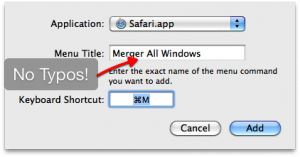
- Select Safari.app from the Application Drop down list
- In the Menu Title section type in the exact name of the menu item. In this case it’s “Merge All Windows”
- Then hit the keyboard combination you want to use in the Keyboard Section. I used CMD+M.
- Click Add.
Now, every time I hit CMD+M in Safari all of my windows combine into one window with a bunch of tabs. It’s made me sane again.
Hat tip goes out to Chasetastic, Mitchell_jj, and thomasborowski on twitter for their suggestions.