AOL accounts not longer usable on iTunes Store for purchases

I love it when I’m looking for an article idea and magically one appears out of the middle of no where.

The writing should have been on the wall when with the Apple TV version 2.0 software you could no longer use an AOL account to purchase media. Since it’s such a small market nobody really noticed too much. Well, today things got even bigger. The iTunes Store in general no longer allows the use of AOL accounts to purchase media.

Apple has been allowing AOL screennames to be used on the iTunes store since December of 2003. So, I wonder what changed to have Apple decide to make this policy change.

I went looking for an article to write, thinking I was going to do an iPhone application review I went to go and purchase one and was presented with the following screen:
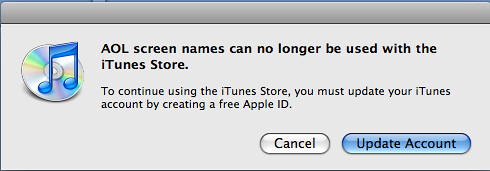
3769991779 b5b184448f AOL accounts not longer usable on iTunes Store for purchases

Was I surprised, well a bit, yes. Was I concerned, no. Since I own an Apple TV (yes, I am that much of an Apple shill) I already setup an account with an email address. I also have an Apple ID that I use for everything. So it was not a big deal, just a little surprise.

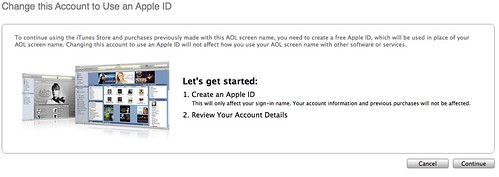
I thought I’d go through the process so I naturally clicked on ‘Update Account’ and was shown the screen below.
3770792462 cf516cbe0e AOL accounts not longer usable on iTunes Store for purchases

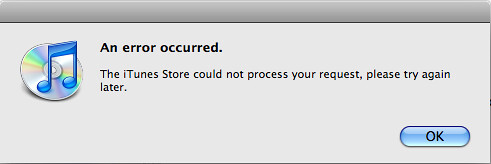
Ok, nothing out of the ordinary here. So, I clicked on ‘Continue’ and was presented with the popup.
3770792492 ba2d72de56 AOL accounts not longer usable on iTunes Store for purchases

What the heck is going on at Apple.

I was able to bypass this error by doing the following.

  1. Click on your current AOL screen name in the upper right corner.
  2. Click on Continue when this screen appears.
  3. 3770792462 cf516cbe0e AOL accounts not longer usable on iTunes Store for purchases

  4. You will now be presented with the update Account screen, as shown below.
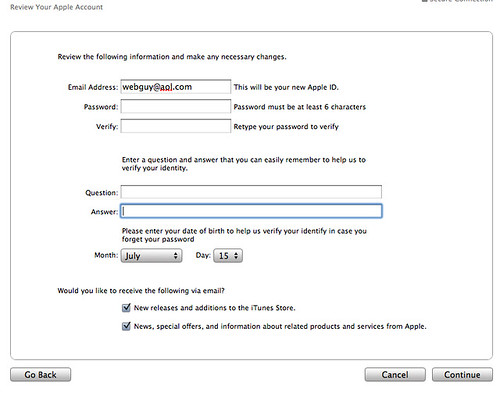
  5. 3770792578 cd52cabd5a AOL accounts not longer usable on iTunes Store for purchases

Here’s where the some interesting stuff happened. I already have an account by that name because of the Apple TV, as stated before. What would happen when I attempted to use the same e-mail address… Well let’s find out.

I was presented with the following error
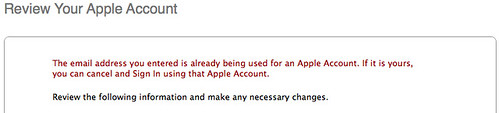
3770792608 9e628403ab AOL accounts not longer usable on iTunes Store for purchases

I decided it was time to switch iTunes over to my Gmail account. I have a feeling that this will be the beginning of changing them all over.

When you enter in the email address and verify the information click on ‘Continue’. You will be presented to update your payment information. The one thing I did not realize is that you can use a Paypal card to pay for your iTunes purchases, quite interesting.
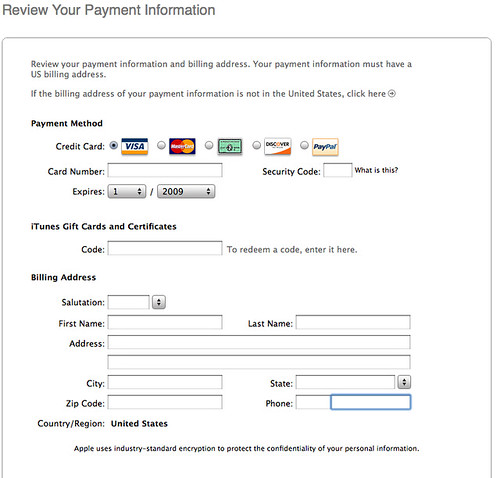
3769992095 ff2e625344 AOL accounts not longer usable on iTunes Store for purchases

Click on Next. That should be everything. Once the conversion is complete you should see a screen similar to the one below.
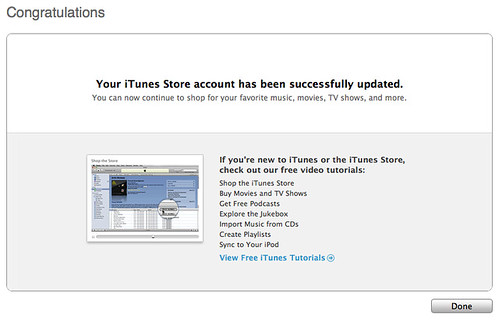
3770792776 051dcc4986 AOL accounts not longer usable on iTunes Store for purchases

That’s exactly how simple it is to convert your iTunes AOL Account to use an email address. If you already have an alternate Apple ID you can use that and just let the AOL Screen name languish.


  • oneemail

    One runs into major problems though, if one’s only email account is the AOL account previously used to sign in to the iTunes store.

  • Wayne Dixon

    Actually it will allow you to use the @aol.com email address. So you’re actually ok to use your AOL account. It’ll just be username@aol.com as the email address. You just can’t use only your aol screenname.

  • http://icanhaz.com/calplz Cal

    Urgh, I can’t bypass the billing information screen, which I have never entered any information on. The usual URL-triggered shortcut I’m used to is useless here because it necessitates creating an entirely new account and I won’t be able to transfer my app and [pre-iTunes Plus] song purchases. What’s worse is that the screen name substitution as suggested by Wayne Dixon above doesn’t appear to be working. I’ve always hated this complication in the sign-up procedure and this added headache of transferring across from my AOL account is all the more infuriating. For all their elegance and prestige, Apple simply CANNOT design user-friendly sign-up forms.

  • http://icanhaz.com/calplz Cal

    Sorry, only just got that Wayne wasn’t referring to a fix, but pointing out that the iTunes store would readily accept a newly created “username@aol.com” screen name. My bad!

  • imcool

    thanks so much!!!

  • imcool

    wait how do you bypass credit card information?

  • itunes prof

    Thanks for the tips!! I was getting the same error screen, and didn’t know what to do. Google led me here, so now I’m following you on RSS!

  • http://www.waynesworkshop.com Wayne Dixon

    Thanks for all of the comments. I’m glad the article was useful. If there’s something you guys see that we’re not covering, let us know.

    • http://www.cerm.info John

      This article saved my day! Thanks for much and I got my music back!

  • Brandon

    You seemed to skip over the part on how to bypass the credit card page if someone like me doesnt have a Credit Card or a paypal account. All I use is itunes cards. HELP.

  • Tom

    Hi I am also having trouble switching over. I only had an aol account and I too cannot bypass the billing information screen. I only use itunes cards. I also fear I lost the remaining balance I had left over on the card. I called Apple and was highly disappointed with run around answers because the technicians had no idea what to do. Any help would be appreciated.

  • http://www.waynesworkshop.com Wayne Dixon

    Unfortunately I do not believe there is a way to bypass the Credit Card information screen. I did not try just clicking ‘next’. I would try emailing the iTunes support using this form http://www.apple.com/support/itunes/contact.html?form=account . I’m not sure if they’ll be any better but I would also recommend being completely thorough with your explanation of not using any payment method excluding Gift cards.

    As for losing your Balance, I do not think that will happen. Take a screenshot before you attempt to change it over, just to be safe though.

    • Greg

      Hi, I switched over my AOL account which had a balance of over $30 and now my new Apple account has $0. They want me to enter my iTune cards to see if there is a balance on the cards. My God, those cards were redeemed and thrown away after they appeared on my account. Now Apple will not assist in retrieving my balance on my AOL account. Any help in this would be appreciated, but I think I’m done with Apple.

  • Susan

    HELP! I created the mandatory apple ID, but now I can’t play any of the songs that I purchased under my AOL ID! It keeps saying that I need to authorize this computer, then it says that this computer is already authorized. Wait time for Itunes support is 45 minutes!

    • Annieb

      same problem here…it’s enough to drive you insane…any answers???

    • Vern

      And it won’t let me sync the ones I bought with my old aol screen name either! I am very upset. I have something like $7,000 worth of purchased downloads and it won’t let me sync them! WHAT!?!?!?!

      Any clues?

  • Trigun

    I lost my credit when I did this update! And it will no longer let me login with my old AOL info to use it. Apple support is brutal! Isn’t it bad enough we have to deal with AT&T. WTF!!!

    • http://www.waynesworkshop.com Wayne Dixon

      Try sending an email to sjobs@apple.com and explain the situation. Also include your AOL username. If that doesn’t work I don’t think there is much else you can do.

  • Sarah Lost

    what happens to your store credit? your authorized Macs? why did they do this? can’t we all just get along? you failed me apple. boo! 0/10 Nice article though, thanks for the info!

    • jb

      for anyone that still reads this forum: if you try to sign in with your AOL account, itunes will say you can’t use it and guide you through making an Apple ID. my store credit was carried over to my new apple ID. as long as you try to sign in first with you aol account, I think your two accounts should be linked.

  • Melissa

    Hi! i found this article while researching a similar problem…I recently moved my iTunes to a new computer and none of the purchases I made when I was using my AOL screen name as my iTunes account will play. It puts me in an endless loop of “This computer is not authorized to play that song” despite the computer being authorized. I spent 2.5 hours on the phone with 3 different apple support people – one was a senior manager type and no one had any idea what the problem was or how to fix it.

    Have any of you experienced this? How did you resolve it?

  • leahr2000

    hey thanks so much for the article! i am getting the similar error message, but unfort. my aol name isn’t showing up in the upper right hand corner like yours did. any advice (i’ve emailed apple, no response)

    • Sue

      my aol didn’t show up either…i just typed in the screen prompt “Let’s Get Started” and it automatically navigated ne to where I needed to be!

  • http://www.keepipprivate.info/ bypass filter

    hey just passed by consedince while searching for some articles :) anyway nice blog Will check it out Later on ,hope you accept me as a follower. thanks ^^

  • Sue

    AWESOME!!! Worked like a charm!! I got my balance back!!!!

    Thanks so much!

    • http://www.waynedixon.com Wayne Dixon

      Sue,

      I’m glad you were able to get your balance back. I’m surprised that more places aren’t reporting this.. maybe the fact that more places aren’t reporting it, means that it is not that big of a deal. But obviously people are still being affected.

      Thanks for Reading Macgasm.

      Wayne

  • Michael

    dear all,

    after various clicks, I finally could switch my AOL account into an Apple ID. But now i am also in the “computer not activated”/”already activated” loop – frustrating!
    Can anyone explain again, what to do now?! Would greatly appreciate!

    @wayne, thanks for initiating this!

    Michael

  • Elease

    PLEASE tell me someone has found a fix for the songs not playing under the old AOL account purchase. Stuck in the authorization loop from hell. Won’t spend another penny on Apple purchases till this is fixed.

    HELP

    • Darlene

      OMG – that circle of hell, already authorized, can’t log in under my AOL name, but a message telling me i have to use that account to authorize all my old songs….does this have to be fixed by AOL tech support or is there something I’m missing???

  • NiKKi

    I hate this! I finally thought I got it working but I still cant listen to a majority of my music!! And there’s no one I can contact about it!

  • http://www.waynedixon.com Wayne Dixon

    You could always try emailing sjobs@apple.com

  • Karli

    Oh my gosh, thank you so much for this. I’ve been trying to update my account on iTunes for quite a while now and couldn’t get past that message, and when trying to create a new account to post in the discussions on the help website it just kept taking me in circles at the profile set up.

    • Needs help whenever possible

      Ok, so here is my dilemma. My AOL account had served me well before the switch to Apple ID became mandatory. When this happened, I opened a new account with my same AOL address as my Apple ID. This was not a problem until I tried to use home sharing to move a couple of songs over to another mac using home sharing. I tried to move the files, and then it said it needed verification on my AOL account. I did this and it then said that the AOL account needed an iTunes Apple ID. So I went through the registration process, and I thought I was done. My iMac thought differently. When I would attempt to play the song, it would ask for verification, and I would enter my information (I tried this with my Apple ID and my AOL account) but it would then say that the account had already been verified; however, I still could not play the song. This has frustrated me, as I have tried to fix this in many ways, but nothing is working. If you could help me, it would be much appreciated. Thank you in advance.

      • SSDD

        My situation is similar.
        1. Had an aol account in itunes
        2. At some point in time, also created an Apple ID with my aol email.
        3. Went along okay for a few years until last night when I couldn’t log in to my aol itunes account. Up to that point I was able to sync, and listen to purchases from both accounts, just fine.
        4. Was successful at converting my aol itunes to an apple ID account.
        5. Now I cannot open half of the stuff I bought, unless I change the itunes account being used, resync, at which point, the purchases (apps, games, music) on the older apple ID account works, but the “new” apple id (once aol) purchases are gone, until the next “swap accounts then sync” routine…The situation itunes used to be able to handle with using purchases from multiple accounts no longer works, seemingly.

        MY MAIN OBJECTIVE IS TO MERGE BOTH APPLE ID ACCOUNTS INTO ONE. Any possibilities there?

  • Karen

    I am also having issues not being able to play songs that were purchased using the older aol account. How do we get help??

  • http://www.775creditscore.com Nathan Henry

    I love this blog. Thanks for the great information. I have it bookmarked and will be back. If anybody needs a new credit file don’t hesitate to come on over.

  • Danielle

    I am also having problems with being able to sign in with my old AOL account. I have over 100 songs which I cannot play.

  • Dan

    I’ve got hundreds of songs that were purchased by my two daughters and myself under the old AOL account option that are no longer playable. I’ve been working with various apple techs over the past two months. One was able to convert my songs, but my daughters tunes are still not playable. Everything purchased after the apple acount conversion is okay, but I’m not inclined to EVER buy another itunes download if it is going to evaporate in a year or two. Has anyone had any luck in getting this fixed? They are acting like this is an unheard problem.

  • Kathy

    I’m having the same issue. I did send an email to iTunes and so far they’re just going to reset my password which makes absolutely no sense to me right now. I know my password so what would resetting it do? I’ll let you know if they actually do anything but it sounds like it’ll be bunkering in and waiting til they make me jump through a few hoops before they really fix it.

    • Kathy

      Unbelievably, it worked. They converted my aol account to an apple account. Only thing is that it counts towards the number of authorized computers.

  • http://www.waynedixon.com Wayne Dixon

    You could always deauthorize all of your computers and then deauthorize the ones you need.

  • Paul

    I was having the same problem with authorization after converting from AOL to an AppleID.

    After using the contact form Wayne linked to in an above post, my problem was solved.

    Here’s what happened in my case. My old AOL login was XXXX. When I was prompted to convert it to an AppleID, I entered XXXX@aol.com. When I tried to use that to login, I’d wind up in that authorization loop hell. It turns out that 2 AppleID’s were created: XXXX@aol.com, and XXXX@aol (no .com). When I log in to AppleID using just XXXX@aol, everything works properly.

    I hope that’s the answer for some others as well.

  • Angry@iTunes

    okay so I might have a unique problem, but I really hope someone can solve it…I had all my music (~8000 songs) in my iTunes library on my old computer before it decided to cease functioning…I’ve been using a new one, which runs Windows 7 (the other one was XP)…and I used an iTunes transfer program to move all my music from my iPod onto this new computer

    I remember when I first created an Apple account after it changed its policy to require no more AOL linkage, so I already have had and been using an Apple Account to purchase music. I was able to listen to all my music on the old computer, but some songs are unable to play on this one because:

    I get that same crazy loop where iTunes asks for authorization, but then when i give my Apple ID it asks me to update, which then gets the “Your request could not be completed…” (etc) message. I’ve tried several things.
    1) using my AOL account to create a new Apple account (using my @aol.com as login name) – this didn’t work because it tells me, upon authorization attempt, that my password or login is incorrect
    2) de-authorizing my computer and then re-authorizing it using my Apple account from before – the one I actively and currently use…this doesn’t seem to work for these songs, which still prompt me to authorize the computer upon playback when using iTunes
    3) de-authorizing and then re-authorizing using my new Apple account (the AOL-name account I just made)…this doesn’t work for the same reason I can’t login with the new Apple account name from AOL

    how can I play these songs?? I am utterly hopeless in this endeavor, it seems

  • Fixed It

    I usually disable access to the iTunes store on my computer prefs, but
    I found that by going to the iTunes Store first, then playing tunes that had been declared not authorized for this computer, the music played, then remained playable (authorized?.
    Hope this works for somebody.

  • http://www.webspawner.com/users/edward61gross/babyplaypensafe.html Freddie Rayson

    Hi,Excellent article dude! i am Fed up with using RSS feeds and do you use twitter?so i can follow you there:D.
    PS:Have you thought about putting video to this web site to keep the people more entertained?I think it works.Sincerely, Freddie Rayson