If you’re dealing with a lot of third party applications in OS X, you’re going to end up looking at some butt-ugly icons from time to time. However, it is fairly simple to simply swap out the default icon file with another.
2 Ways to Change App Icons on MacBook
- Navigate to said butt-ugly application in the Finder.
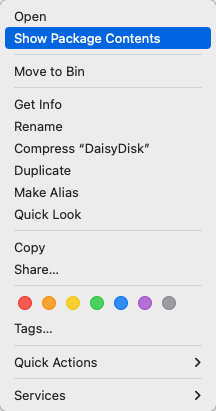
- Control-Click on the application, then click “Show Package Contents” in the contextual menu.
- Navigate from there to Contents>Resources.
- In this folder you will find the ugly icon (Usually with a name like PS_App_Icon.icns). Archive the image if you might want it back.
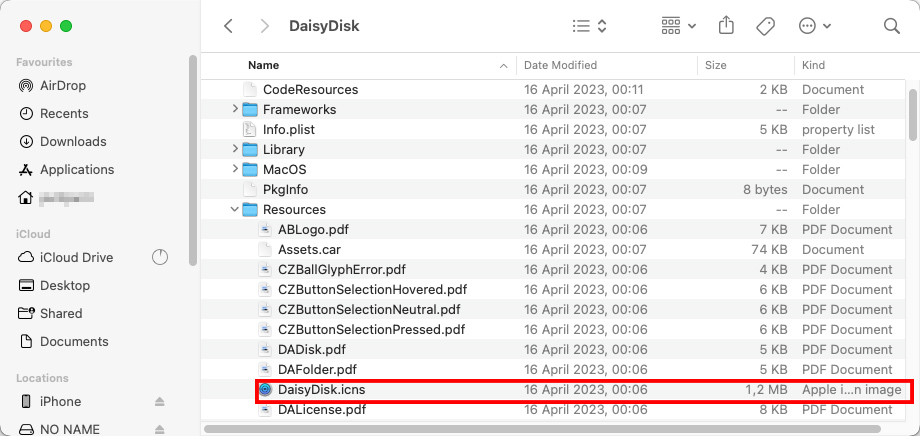
- Remove the ugly icon, and replace it with another icon file of your choice.
For those who want a swift, no-nonsense method to change app icon Mac style, the drag-and-drop technique is a game-changer. Here’s how to do it:
- First, find an icon file you love. It should be an .icns file for best results.
- Open the folder where your new icon is located.
- Now, open another Finder window and navigate to your not-so-pretty application.
- Right-click on the application, select ‘Get Info’, and leave this window open.
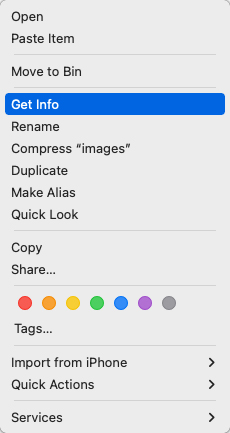
- Simply drag your new icon file from its Finder window and drop it directly onto the small icon in the top left corner of the ‘Get Info’ window.
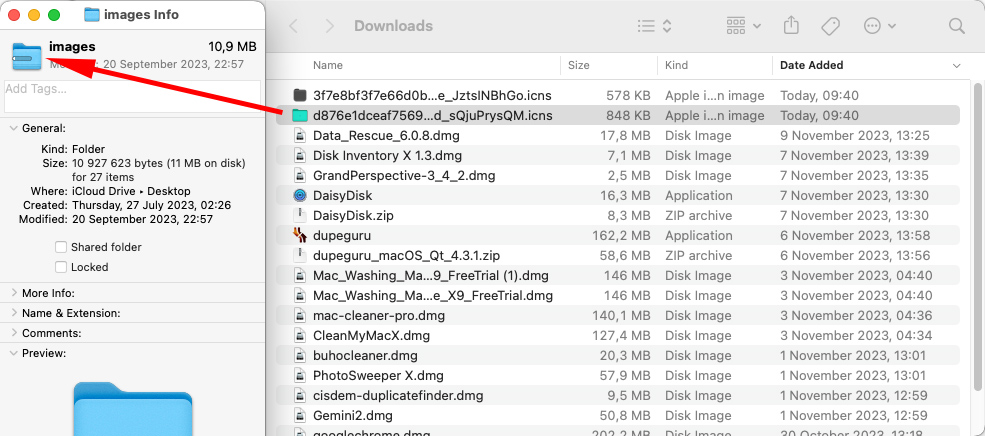
With this method, you change Mac app icons in a snap, giving your MacBook a fresh look.
Undoing the Magic: Getting the Old Look Back
Changed your mind? No problem. Here’s how to get the original icon back:
- Right-click on the application and select ‘Get Info’.
- Click on the small icon in the ‘Get Info’ window and hit the ‘Delete’ key. This action will restore the original icon.
- Alternatively, if you archived the original icon, simply drag and drop it back into the ‘Get Info’ window.
And there you go – a complete guide on how to change app icons on Mac, both to something new and back to the old. And remember, there’s always a way back if you decide that the original icon wasn’t so bad after all. So go ahead, give your Mac a little makeover, and enjoy a fresh look on your desktop. Who knows, it might just make those mundane tasks a bit more enjoyable!